Ask ChatGPT to recommend a company in your industry and it will name three or four. If yours is not one of them, that buyer never sees you, and your Google rankings will not tell you it happened.
That is why you need to track brand visibility in ChatGPT and other AI search tools as a separate job. AI answers have no page one and no fixed positions. They change with the wording of the question, the platform, and the day.
This guide gives you the free method I use on my own sites and on the small businesses I audit: a fixed list of 10 prompts, four platforms, one tracking sheet, and a monthly routine that takes about an hour.
Quick answer: To track your brand’s visibility in ChatGPT and AI search, write a fixed list of 10 buyer-style prompts and run them every month in ChatGPT, Perplexity, Google AI Overviews and Gemini. Record five things each time: whether you are mentioned, whether your website is cited, how you are described, which competitors appear, and which sources are used.
Would you like the first check done for you? Request a free AI visibility snapshot and I will run your prompts and send you the results.
Key takeaways
- AI visibility is measured in mentions and citations, not ranking positions.
- A fixed list of 10 prompts, run monthly on four platforms, is enough for most small businesses.
- One buyer question becomes several hidden searches, called query fan-out, so your prompt list must cover the sub-questions too.
- Record five signals every time: mention, citation, description, competitors named, and sources cited.
- The sources an AI cites tell you where to act next.
- Google Search Console reports your visibility in Google’s AI features. For ChatGPT and Perplexity, a manual prompt check is the practical free option.
Why is tracking AI visibility different from tracking Google rankings?
AI visibility cannot be tracked like a Google ranking because an AI answer has no fixed positions. ChatGPT, Perplexity and Google’s AI features write a new answer each time, so your brand is either mentioned, cited as a source, or absent. The result changes with the prompt wording, the platform, the user’s location and the day.
| Google rankings | AI answers | |
|---|---|---|
| What you measure | Position 1 to 100 for a keyword | Mentioned, cited, or absent for a prompt |
| Stability | Fairly stable day to day | Changes between runs of the same prompt |
| Personalisation | Mostly by location | Location, wording, and saved memory |
| Where the data comes from | Search Console and rank trackers | Manual prompt checks, plus Search Console for Google’s AI features |
| What one check tells you | Your position today | One sample, not a score |
Three documented behaviours explain the difference:
- Your question gets rewritten. OpenAI states that ChatGPT search typically rewrites a prompt into one or more targeted queries, and may send further, more specific queries after reviewing the first results. See Searching the web with ChatGPT.
- Location and memory shape the answer. The same OpenAI page says ChatGPT estimates a general location from the IP address and, when memory is on, may use saved memories when rewriting the search.
- Google’s AI fans out. Google says AI Overviews and AI Mode can run a set of related searches at once to build a response. See Google’s guide to generative AI features in Search.
In short: a single check is a sample. Only repeated checks with the same prompts show a trend you can trust.
What should you measure when you track brand visibility in AI search?
Measure five signals for every prompt: whether your brand is mentioned, whether your website is cited as a source, how accurately you are described, which competitors appear instead, and which sources the answer relies on. Together they show if AI tools know you, trust you, and recommend you, which a single yes or no cannot show.
| Signal | Definition | How to record it |
|---|---|---|
| Mention | Your brand name appears in the answer text | Yes or No |
| Citation | A page from your website is linked as a source | Yes or No, plus the URL |
| Description accuracy | What the AI says about you matches your real services, location and customers | Accurate, Outdated, Wrong, or Blank |
| Competitors named | Other businesses the answer recommends | List the names |
| Sources cited | The websites the AI used to build the answer | List the domains |
One number sums it up. Mention rate is the share of your prompts in which your brand is mentioned. If you appear in 3 of 10 prompts on ChatGPT, your ChatGPT mention rate is 30%. Track it per platform, because the four platforms rarely agree.
How do you build a prompt list using query fan-out?
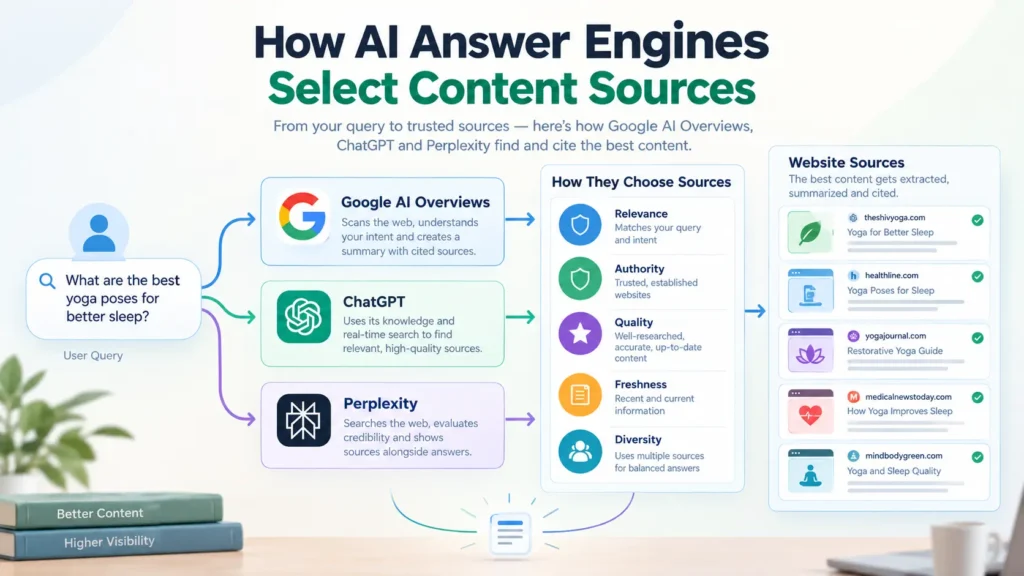
Query fan-out is when an AI search system turns one question into several related searches and builds its answer from the combined results. Google documents it for AI Overviews and AI Mode, and OpenAI describes similar query rewriting in ChatGPT search. For tracking, your prompt list must cover the sub-questions behind a buyer’s question, not only the main one.
Google’s own example: a question about fixing a lawn full of weeds can fan out into searches about herbicides, chemical-free weed removal, and weed prevention. The person asked one thing. The AI searched for three.
Here is how one buyer question might fan out for an IT staffing firm in Noida. This is my working model, because no platform publishes its exact sub-queries.
| Buyer asks | Likely sub-searches behind the answer |
|---|---|
| “Which IT staffing company should I hire in Noida?” | best IT staffing companies in Noida |
| IT staffing agency reviews Noida | |
| contract staffing rates in India | |
| IT staffing agency vs in-house hiring | |
| IT staffing for startups vs enterprises | |
| [your brand name] reviews |
If your business shows up for the first search but not the other five, the final answer may still leave you out. So build your list of 10 prompts across five types, two prompts per type:
| Prompt type | Template | Fan-out angle it covers |
|---|---|---|
| Category | “What are the best [service] companies in [city]?” | The head question |
| Category | “Top [service] providers for [customer type]” | Audience fit |
| Buyer problem | “I’m a [customer] looking for [service]. Who should I consider and why?” | How real buyers ask |
| Buyer problem | “How do I choose a [service] provider?” | Selection criteria |
| Brand | “What do you know about [business name]?” | What AI believes about you |
| Brand | “Is [business name] a good choice for [specific need]?” | Reviews and reputation |
| Comparison | “Compare [your business] with [main competitor].” | Head-to-head strengths |
| Comparison | “What are the alternatives to [main competitor]?” | Whether you are seen as an option |
| Constraint | “Affordable [service] in [city] for small businesses” | Price and size |
| Constraint | “Which [service] providers do you recommend for [specific need], and what sources are you using?” | The sources behind the answer |
Three rules keep the list useful:
- Freeze it. Use the same 10 prompts every month, or you cannot compare results.
- Write like a buyer. Use full questions with a location, the way people talk to ChatGPT.
- Stay neutral. Do not ask “why is [your brand] the best”, because a leading prompt gives a flattering and useless answer.
How to track your brand’s visibility in ChatGPT and AI search, step by step
To track your brand’s visibility in ChatGPT and AI search, run the same 10 prompts in a clean session on four platforms, record five signals for each answer, and repeat on the same day every month. The first run takes about 90 minutes. Later runs take about an hour.
- Write and freeze your 10 prompts. Use the five prompt types above. Save them in the first tab of your sheet so the wording never drifts.
- Start with a clean session. Open a new chat for every prompt. In ChatGPT, use a temporary chat or turn memory off, because saved memories can change the search. Note the city you are testing from.
- Run the prompts in ChatGPT with search on. Read the answer, then open the Sources panel. Record whether you are mentioned and which websites are cited.
- Repeat in Perplexity. Perplexity shows numbered sources on almost every answer, which makes it the easiest place to see where AI gets its information.
- Repeat in Google. Search the same prompt and check two places: the AI Overview at the top of the results, if one appears, and AI Mode.
- Repeat in Gemini. Gemini often describes brands differently from Google’s search features, so treat it as its own platform.
- Run your two category prompts three times each. These are the prompts where answers vary most. If you appear in one run of three, record it as “sometimes”, not “yes”.
- Log everything in the sheet. One row per prompt per platform. Paste the sources, not only the yes or no.
- Check Search Console for Google’s side. Google provides a generative AI performance report in Search Console that shows how your pages perform in its AI features. Use it alongside your manual checks.
- Calculate your mention rate and pick one action. Compare the rate with last month, then choose one fix from the section on what to do if you are not showing up.
A free AI visibility tracking sheet you can copy
A simple spreadsheet with nine columns is enough to track AI visibility. Each row holds one prompt on one platform on one date. After three months you can filter by platform or prompt and see whether your mentions are rising, flat or falling.
The rows below are sample entries to show the format. They are not real results.
| Date | Platform | Prompt | Mentioned | Cited | Description | Competitors named | Sources cited | Notes |
|---|---|---|---|---|---|---|---|---|
| 2 Oct 2026 | ChatGPT | Best [service] companies in [city]? | No | No | Blank | Competitor A, Competitor B | directory site, review site | Both competitors are listed on the directory |
| 2 Oct 2026 | Perplexity | What do you know about [business name]? | Yes | Yes | Outdated | None | own website, LinkedIn | Still shows the old service list |
| 2 Oct 2026 | Google AI Overview | How do I choose a [service] provider? | No | No | Blank | Competitor A | Competitor A blog | They have a guide on this question |
Add a second tab called Summary with one row per month and one column per platform, and enter the mention rate for each. That one table is your trend line.
How often should you check your AI visibility?
Check your AI visibility once a month. Monthly checks are frequent enough to show a trend and spaced enough for changes to your website and listings to take effect. Run the check on the same day each month, and move to weekly checks only around a launch, a rebrand or a major website change.
I check my own sites daily because I test changes on them. You do not need to. What matters is that the prompts, platforms and method stay the same, so that month three can be compared fairly with month one.
Judge progress over three months, not one. A single month can move up or down for no reason you control.
What should you do if your brand is not showing up in AI answers?
If your brand is missing from AI answers, fix three things in order: make your website state plainly who you serve, where, and for what; earn real mentions on the directories and review sites the AI already cites; and publish pages that answer the questions buyers ask. Then re-run your prompts next month.
Your tracking sheet tells you which fix comes first:
| What the sheet shows | Likely cause | What to do |
|---|---|---|
| Not mentioned on any platform | AI tools cannot find or crawl your site | Confirm your pages are indexed in Google and that your site allows OpenAI’s OAI-SearchBot crawler. Start with why your website is not showing on Google. |
| Competitors named, same directories cited every time | You are absent from the sources AI trusts | Get listed on those exact directories and review sites, with accurate details |
| Mentioned but described wrongly | Old or conflicting information about you online | Correct your own site first, then your business profiles and listings |
| Cited for brand prompts, absent for category prompts | Your site does not answer buyer questions | Add pages that answer them directly. See what answer engine optimization is. |
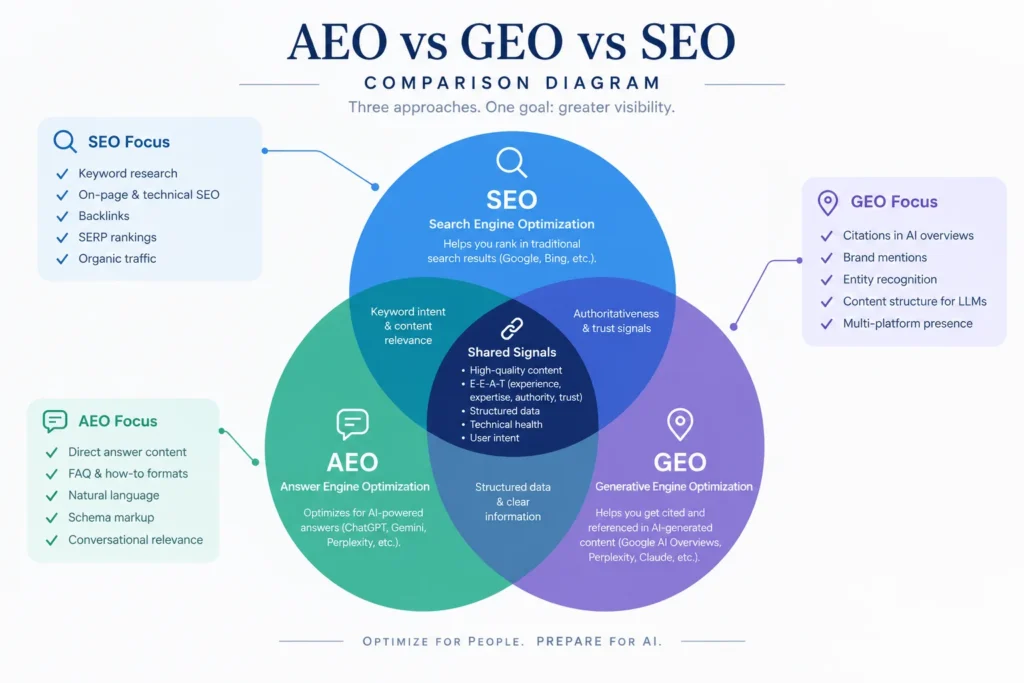
If the terms are new to you, my guide to AEO vs GEO vs SEO explains how the three fit together.
Six common myths about tracking AI visibility
Most bad advice about AI visibility comes from treating AI answers like search rankings, or from tools and tactics that promise more than they can deliver. Each myth below is checked against what Google and OpenAI state in their own documentation.
Myth: A number one Google ranking means AI will recommend you.
Fact: Ranking helps, because Google says its AI features are built on its core ranking systems. But AI answers also draw on related searches and on what other websites say about you, and ChatGPT uses its own search partners. Track both.
Myth: One check tells you your AI visibility.
Fact: OpenAI confirms that query rewriting, location and memory all shape a ChatGPT answer. One run is a sample. A trend needs the same prompts repeated over months.
Myth: An llms.txt file gets you into AI answers.
Fact: Google states that its Search and AI features do not use llms.txt, and that having one neither helps nor harms your visibility there.
Myth: A paid tool can show your true AI rank.
Fact: Google states that no third-party tool has access to its internal ranking or AI systems. Paid trackers run sample prompts, as you do by hand, only at larger scale.
Myth: You should publish a page for every fan-out query.
Fact: Google warns that creating separate content for every search variation, mainly to influence AI responses, breaks its scaled content abuse policy. Cover sub-questions inside useful pages instead.
Myth: What ChatGPT says about your business is always correct.
Fact: OpenAI’s own help page says search results and citations can be incomplete, outdated or incorrect. That is why the brand prompts matter. When AI gets you wrong, fix the facts at the source it cites.
Free manual tracking vs paid AI visibility tools
A manual tracking sheet is enough for a small business with one brand, one market and up to about 30 prompts. A paid AI visibility tool earns its cost when you track several brands or locations, need daily data, or report to clients. Start manually, and upgrade only when the sheet takes more than two hours a month.
| Manual sheet | Search Console AI report | Paid AI visibility tool | |
|---|---|---|---|
| Cost | Free | Free | Monthly subscription |
| Platforms covered | Any you test by hand | Google’s AI features only | Several, depending on the tool |
| What it shows | Mentions, descriptions, competitors, sources | How your pages perform in Google’s AI features | Mention and citation trends across many prompts |
| Effort | About an hour a month | A few minutes | Setup, then automatic |
| Best for | Small businesses and first-time tracking | Every site owner | Agencies and multi-location brands |
Examples of paid options include Ahrefs Brand Radar and Semrush’s AI visibility features. Whichever you choose, keep your manual brand prompts. A dashboard shows how often you are mentioned. Reading the answers shows what is being said.
Frequently asked questions
How do I check if ChatGPT mentions my business?
Open a new ChatGPT chat with search on and ask two prompts: What are the best [your service] companies in [your city]? and What do you know about [your business name]? Read the answer, then open the Sources panel to see which websites it used.
How often should I track my AI search visibility?
Once a month is enough for most small businesses. Use the same prompts, the same platforms and the same day each month. Switch to weekly checks only around a launch, a rebrand or a major website change, and judge progress over three months.
Is tracking AI visibility the same as tracking SEO rankings?
No. SEO rank tracking records your position for a keyword. AI visibility tracking records whether your brand is mentioned or cited in a generated answer, how it is described, and which competitors and sources appear. The two overlap, but each needs its own check.
Do I need a paid tool to track brand visibility in ChatGPT?
No. A fixed list of 10 prompts and a spreadsheet is enough for one brand in one market. Paid AI visibility tools become worthwhile when you track several brands or locations, need daily data, or report results to clients.
Why does ChatGPT give a different answer each time I ask?
ChatGPT writes each answer fresh. OpenAI says it rewrites your prompt into one or more search queries and may use your approximate location and saved memories. Small changes in any of these change the sources it reads, so the brands it names can differ between runs.
Start tracking this week
Tracking your brand’s visibility in ChatGPT and AI search takes a list of 10 prompts, four platforms, one sheet and about an hour a month. The businesses that start now will have months of data, and a clear list of fixes, before their competitors run a first check.
Build your prompt list today and run it once. That first row in your sheet is your baseline.
If you would like a second pair of eyes, request a free AI visibility snapshot. I will run your prompts across ChatGPT, Perplexity and Google, and send you what I find, including the sources your competitors are being cited from. To see how this fits into a wider plan, read about our AI-driven marketing solutions.

- SEO Audit Checklist: 40 Checks You Can Run With Free Tools - October 20, 2026
- How to Track Your Brand’s Visibility in ChatGPT and AI Search - October 3, 2026
- AEO vs GEO vs SEO: What’s the Difference? (2026 Guide) - September 23, 2026